Evaluation Workflow
Important
Before running evaluations, make sure you have completed the Getting Started guide. Accurate calibration is critical, as even small errors can cause perception failures. Use viz-gripper-cam (see screenshot below) to sanity check the gripper mask overlay. If it looks very off, the camera may have been knocked and needs re-calibrating. If grasps are consistently slightly off across trials, that can also indicate the calibration has drifted.
A typical evaluation session follows this loop:
Set up the scene
Run
tiptop-runLabel the outcome (success, failure, or skip)
Repeat
Scene Setup
Use viz-gripper-cam while arranging objects to verify everything is within
view of the hand camera. As TiPToP currently uses a single view of the workspace, anything outside of view cannot be
perceived and manipulated.
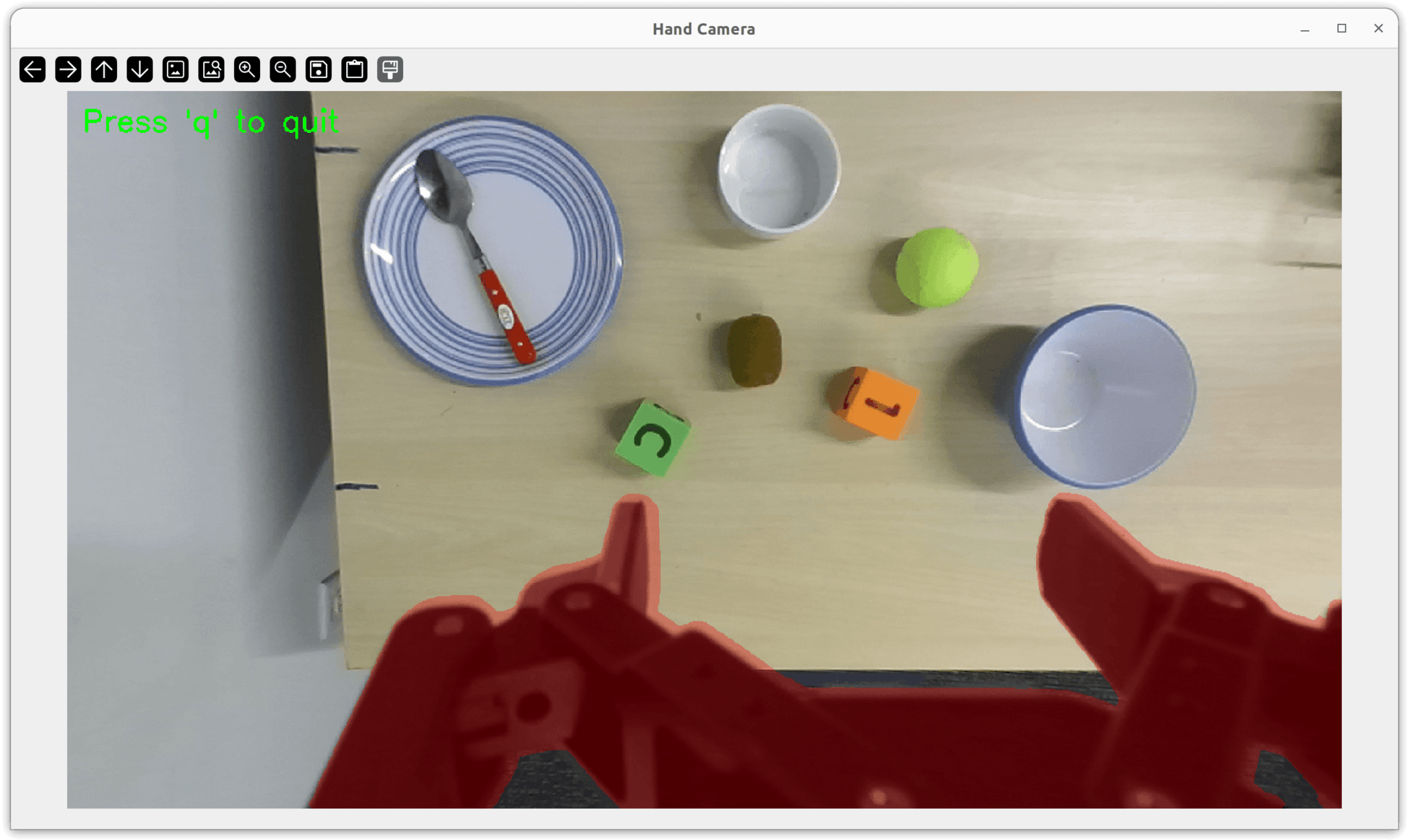
All objects are clearly visible within the hand camera’s field of view. The red overlay is the gripper mask.
Comparing to Baselines
When comparing against a baseline (e.g., a VLA), precise scene resets matter to ensure fair experiments. Run
viz-scene before the first trial to save a reference image of the scene using the
save button 💾 in the OpenCV window toolbar. Between trials, pass that image back to viz-scene using the --ref-scene
flag to visually align objects to their exact starting positions:
viz-scene --ref-scene path/to/reference.png
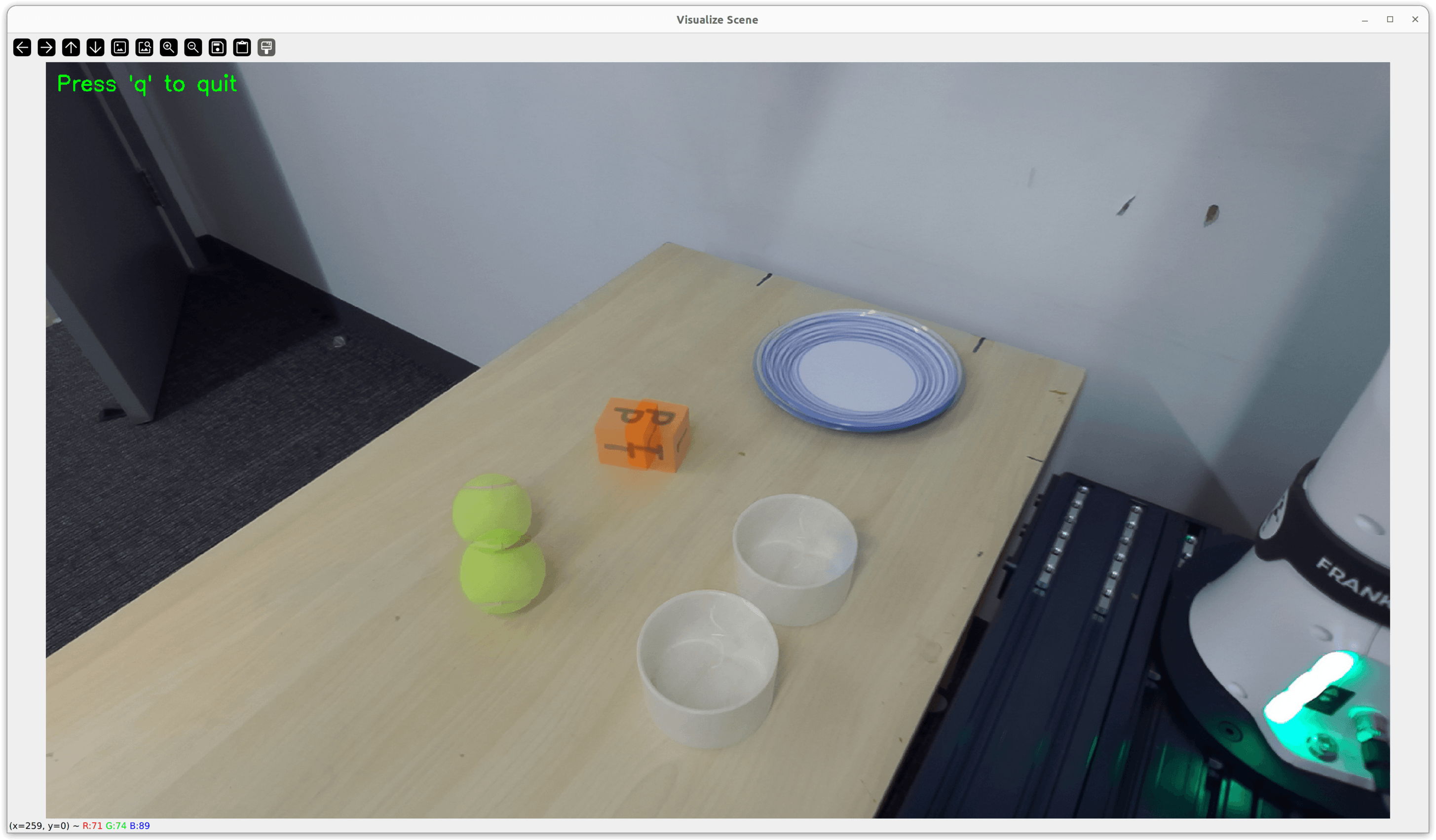
viz-scene blending the current camera view with a reference image. The ghost objects show where they should be placed to match the starting configuration.
Running TiPToP
Use tiptop-run with flags tailored to your evaluation needs:
# Standard evaluation (prompts for labeling after each trial)
tiptop-run

# Record gripper and external camera video for review
tiptop-run --enable-recording

# Dry run without executing on the robot and visualize cuTAMP plans
tiptop-run --no-execute-plan --cutamp-visualize

# Save results to a custom directory
tiptop-run --output-dir experiments/packing_task
Tip
We recommend --enable-recording for evaluations so you can review executions after the fact. Note that this adds processing time at the end of each trial to convert footage to MP4, and results in larger rollout directories.
See the tiptop-run command reference for the full list of options.
Labeling Results
After each execution, you’ll be prompted to label the rollout:
Was the execution successful?
Enter 'y' for success, 'n' for failure, or leave empty to skip:
y— Rollout moved to{output_dir}/success/{date}/{timestamp}/n— Rollout moved to{output_dir}/failure/{date}/{timestamp}/Empty — Rollout stays in
{output_dir}/eval/
Following DROID’s convention, rollouts are organized by label and date:
tiptop_outputs/
├── eval/                    # Staging area for unlabeled rollouts
│   └── {timestamp}/         # e.g., 2026-01-24_14-30-45/
├── failure/                 # Failed execution rollouts
│   ├── 2026-01-24/
│   │   └── {timestamp}/
│   └── 2026-01-25/
│       └── {timestamp}/
├── success/                 # Successful execution rollouts
│   ├── 2026-01-24/
│   │   └── {timestamp}/
│   └── 2026-01-25/
│       └── {timestamp}/
└── recordings/              # (Optional) Additional recording data